Key Takeaways
- CARFAX uses your VIN to gather vehicle history from thousands of trusted data sources and compiles it into a single report.
- A clean CARFAX report isn’t a guarantee. It can only show records that were officially reported.
- Businesses can use CARFAX alternatives like the Vehicle Databases API to integrate vehicle history data into their own platforms.
Millions of used car buyers pull a Carfax report before handing over their money, but few actually know what’s happening behind that VIN search. How does Carfax work, exactly?
In this guide, we’ll walk through how Carfax works from the moment you enter a VIN to the moment a vehicle history report lands in your inbox, where all that data actually comes from, what Carfax shows on a typical report, and how the company behind it makes money in the first place.
What Is Carfax? A Simple Explanation
Carfax was founded in 1984, originally built to verify odometer readings and cut down on mileage fraud. It started with a database of around 10,000 vehicle records. Within about a decade, Carfax was pulling records from across all 50 states, and by its tenth anniversary it had surpassed 100 million records.
Today, Carfax is widely considered the largest vehicle history database in North America, and it’s become the default reference point most used car buyers reach for before making a purchase.
How Does Carfax Actually Work?
At its core, how Carfax works comes down to a fairly simple process: decode a VIN, match it against a massive database of vehicle records, and compile whatever’s on file into a report.
Step 1: You Enter a VIN or License Plate
Every request starts with a Vehicle Identification Number (VIN) which is a unique 17-character identifier assigned to a specific vehicle, or, in some cases, a license plate and state.
You don’t need to provide any other details about the car; the VIN alone is enough to pull whatever records exist.
Step 2: Carfax Decodes and Matches the VIN
Once submitted, Carfax decodes the VIN to identify the vehicle’s year, make, model, trim, and manufacturing details, then uses that identifier to search its database for any records tied to that specific vehicle.
Step 3: Carfax Pulls Records From Its Data Network
This is really the heart of how Carfax gets their information. It queries its network of data partners for any events tied to that VIN: title changes, accidents, service visits, ownership transfers, and more. This is covered in more detail in the next section.
Step 4: The Report Is Compiled and Delivered
Once the matching records are gathered, Carfax compiles them into a single, organized report and delivers it to whoever requested it, whether that’s a private buyer, a dealer, or a business checking a vehicle before purchase or resale.
Why VIN Standardization Matters
Carfax reports are only available for vehicles manufactured since 1981, the year the 17-character VIN format was standardized in the U.S. Before that, VINs varied in length and structure by manufacturer, which makes them much harder to decode consistently.
That’s why classic cars and older vehicles often come back with thin or nonexistent Carfax records; the standardized system this entire process depends on simply didn’t exist yet.
How Does Carfax Get Their Information?
How Carfax gets their information is one of the most common follow-up questions once people understand the basic lookup process.
The short answer: it comes from a massive network of third-party sources that voluntarily share records, not from Carfax itself going out and inspecting vehicles.
Carfax pulls from more than 151,000 sources across the U.S. and Canada, including:
- All 50 U.S. state DMVs and many Canadian provincial motor vehicle agencies
- Insurance companies
- Collision repair and body shops
- Auto auctions and salvage yards
- Law enforcement and fire departments
- Rental and fleet management companies
- Dealerships
- Import/export companies
- State emissions and safety inspection stations
Each source contributes a different piece of the puzzle, and Carfax stitches those individual records together using the VIN as the common thread.
What Carfax Does Not Do
It’s worth being direct about this: Carfax does not physically inspect vehicles, and it does not verify the accuracy of the records it receives. It’s a data aggregator, not an inspector.
If a source reports inaccurate information, that inaccuracy can end up on the report unchecked. And if an event, like a privately paid repair or an accident that was never reported to police or insurance, never reaches one of Carfax’s data partners, it simply won’t appear on the report at all
A clean report means no negative records were found, not that none exist.
READ ALSO: Car Data API: Why is the vehicle data API important? (Explained)
What Does Carfax Show on a Report?
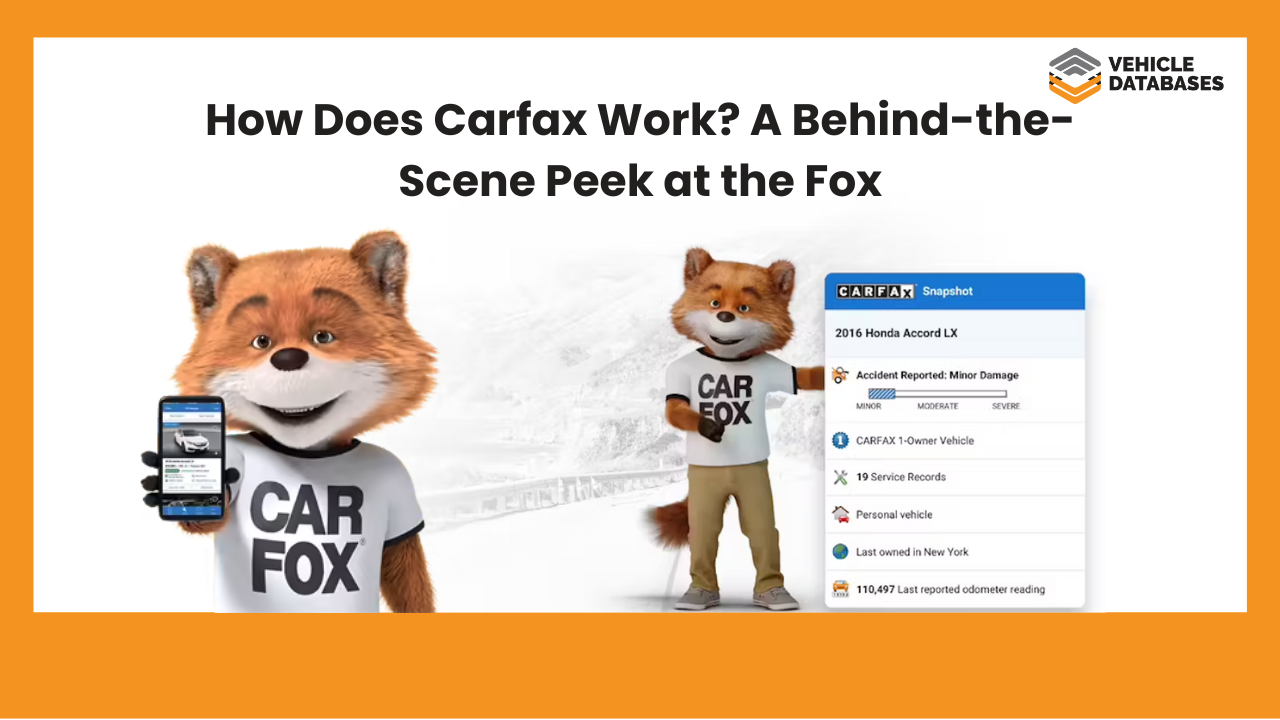
So, what does Carfax show once all that data comes together? A typical Carfax Vehicle History Report can include:
1. Car Accidents and Damage Records
With a VIN check, anyone can tell if a vehicle has been involved in any car accidents and whether it sustained severe damage, too. A vehicle history report should show the number of car accidents a vehicle was involved in, the severity of damages, areas affected, location of the accident, and more.
Sometimes, however, minor accidents are not recorded and may not be found on a report. It’s essential to understand that only records that are officially reported can be found in a report. For example, a minor fix in the garage could never wind up on a history report.
2. Title Status
With title fraud and the rest going on out there, it is important to know the status of a vehicle’s title, and a Carfax vehicle history report provides this information. With a VIN check, car buyers and sellers can verify if a vehicle has a salvage title – meaning its been totaled in the past, or probably a rebuilt title.
There are several title brand records that could be spotted with a VIN check, including flood brand, junk title brand, lemon title, and more.
3. Market Value
Another important component of a car’s report is the market value. A report shows the vehicles current worth as well as past sales and auction records, if available. With this information, car buyers can discover the actual value of vehicles based on their records.
4. Maintenance Records
A vehicle with a good service and maintenance history is usually a good purchase, so consumers look for these records. A vehicle history report provides users with records of all routine maintenance, major repairs, and service intervals. It also shows where the vehicle was taken for repairs and maintenance.
Note, however, that maintenance records may not include activities done at home and not reported to a dealership or repair shop.
5. Vehicle Recalls
Vehicle recalls are also important to note as they show a vehicle’s safety. What components were affected? What are the consequences? A vehicle history report can help answer these questions.
It can also help sellers and dealers fix and repair vehicles they have for sale.
6. Ownership History
Having an idea of how many times a vehicle has changed hands can help you understand its reliability. A vehicle that has had several owners within a short period of time definitely has some hidden problems, and car buyers don’t want to end up with those.
If you are a used car buyer, you should prioritize vehicles with fewer owners. Also, pay attention to vehicle usage. Was it used for business? Was it driven locally? A report can provide all of these.
7. Warranty Status
A Carfax report can help users determine whether a vehicle is under warranty and what type of warranty is available.
Find out about any existing factory warranties, including the remaining coverage period.
8. Odometer Readings
Accurate odometer readings are essential for verifying the mileage of a vehicle and detecting potential fraud. A vehicle history report shows mileage readings taken at various points in the vehicle’s history.
You can also check for discrepancies that might indicate odometer rollback or tampering.
Now you know what information can be found on a Carfax report. If you are planning to start your own business and provide reports to interested parties, take note of the above information.
What Carfax Can't Tell You
A Carfax report is genuinely useful, but it has real limits worth understanding before you treat it as the final word:
- Reporting gaps: If an accident or repair was paid for out of pocket and never touched an insurer, police report, or reporting shop, Carfax has no way to know about it.
- No real-time updates: There’s a lag between an event happening and it showing up on a report. A car sold or wrecked yesterday might not reflect that yet.
- No physical inspection: Carfax never puts a vehicle on a lift. Mechanical issues, wear, or damage that was never formally reported won’t appear, no matter how significant.
This is exactly why most experienced buyers pair a Carfax report with an independent pre-purchase inspection rather than relying on the report alone. It also advisable to get history reports from more than one provider. Our top recommendation is Detailed Vehicle History.
Let’s see how they compare to Carfax:
Carfax
$44.99
|
❌ Sales listing with photos |
|
❌ Auction records with photos |
|
✔️ Market value data |
|
— Detailed vehicle specifications (Limited) |
|
❌ Window stickers |
|
❌ Support for classic vehicles |
|
✔️ Maintenance recommendation |
|
✔️ Ownership history |
|
✔️ Accident history |
|
✔️ Damage check |
|
✔️ Branded title check |
|
✔️ Salvage title check |
|
❌ Ownership history map |
|
✔️ Recalls |
|
❌ Supports for heavy duty trucks, ATVs, trailers & motorcycles |
|
— Mobile & desktop applications (Limited) |
Detailed Vehicle History
$19.99
|
✔️ Sales listing with photos |
|
✔️ Auction records with photos |
|
✔️ Market value data |
|
✔️ Detailed vehicle specifications |
|
✔️ Window stickers |
|
✔️ Support for classic vehicles |
|
✔️ Maintenance recommendation |
|
✔️ Ownership history |
|
✔️ Accident history |
|
✔️ Damage check |
|
✔️ Branded title check |
|
✔️ Salvage title check |
|
✔️ Ownership history map |
|
✔️ Recalls |
|
✔️ Supports for heavy-duty trucks, ATVs, trailers & motorcycles |
|
✔️ Mobile & desktop applications |
Carfax Company Overview: Services, Monetization Model, and How It Works
Beyond the mechanics of a single VIN lookup, it’s worth understanding the broader Carfax business model, that is, how the company operates and actually makes money.
Core Services
- Vehicle History Reports: The flagship paid product, sold per-report or in discounted multi-report bundles, primarily to consumers and dealers
- Carfax Car Care: A free service for vehicle owners offering service history tracking, recall alerts, and repair shop recommendations
- Dealer-facing tools: Inventory and marketing products, including “Show me the Carfax” branded listings, Buyback Guarantee programs, and dealer data subscriptions
- Market data products: Pricing and depreciation insights, predicted reliability scores, and the monthly Carfax Used Car Index
Monetization model
Carfax’s revenue is built primarily on a B2C and B2B hybrid: individual consumers pay per report (or in bundles) when shopping for a used car, while dealerships pay for bulk access, marketing integrations, and branded report placements on their listings.
The free Car Care service functions as a lead-generation and retention layer. It keeps consumers engaged with the Carfax ecosystem (and contributing/consuming data) without directly charging them, while dealers and data licensing largely carry the commercial weight.
This dual approach is the core of how the Carfax business model turns a data aggregation service into a sustainable, high-margin business.
READ ALSO: Do insurance companies automatically report to Carfax?
Can Businesses Access Carfax-Style Data Through an API?
Not exaclty. For developers and automotive businesses, a natural question is whether Carfax’s data can be pulled programmatically through a Carfax API.
In practice, this is more complicated than it sounds because direct Carfax API access is typically restricted to approved partners, public documentation is limited, and pricing tends to follow custom licensing agreements rather than transparent usage-based plans.
This is where alternatives like the Vehicle Databases Vehicle History API come in. Instead of navigating restrictive partner requirements, businesses can pull comparable vehicle history data, including:
- Vehicle specifications
- Title history
- Accident history
- Mileage records
- Ownership history
- Service and maintenance records
- Recall information
- Structural damage report, and more.
They get this through a standard REST API with straightforward documentation, making it a practical Carfax API alternative for platforms that need this data built directly into their own product.
One of the most important features of this Carfax API is that you can integrate it easily and get access to information on your website or VIN scanner apps. You can also use it to generate Carfax-like reports from your app in HTML form (fully customized) after registration.
With easy access to a vehicle database with over 80 million records, you can improve your business efficiency and sales. Sign up today and grow your business.
Final Thoughts on How Carfax Works
At the end of the day, Carfax is a data aggregator, not an inspector – it can only report what its network of 151,000+ sources chooses to share with it.
Understanding how Carfax works, where its data comes from, and where the gaps are puts you in a much better position to use it wisely, whether you’re a buyer double-checking a used car or a business evaluating whether to build similar vehicle history features into your own platform.
For developers and automotive businesses exploring that second path, Vehicle Databases’ Vehicle History API offers a more accessible way to integrate comparable data without the restrictions of a traditional Carfax API partnership.
FAQs About How Carfax Works
How does CARFAX work when buying a car?
CARFAX provides detailed vehicle history reports using the car’s VIN. These reports include data from over 139,000 sources, such as motor vehicle agencies, insurance companies, and repair facilities, helping buyers make informed decisions
How does CARFAX work when selling a car?
Sellers can use CARFAX to obtain a vehicle history report, enhancing transparency and trust with potential buyers. Additionally, CARFAX offers a “Sell My Car” feature, allowing users to get cash offers from participating dealers.
How does CARFAX get its information?
CARFAX gathers data from various sources, including U.S. motor vehicle agencies, auto auctions, collision repair facilities, insurance companies, and more, compiling comprehensive vehicle histories.
Is CARFAX free?
CARFAX reports are typically paid, but some dealerships or online listings may offer a free CARFAX report as part of their service.
How much does CARFAX cost for dealers?
Pricing for dealers varies based on subscription plans and the number of reports needed. Dealers should contact CARFAX directly for specific pricing details.
How does Carfax know about accidents?
Carfax knows about accidents since most accident data comes from insurance claims, police reports, collision repair facilities, and salvage auctions, which they are affiliated with. If an accident never triggers one of those channels, for example, a privately paid repair, Carfax has no record of it.
Does Carfax work for cars made before 1981?
Not reliably. Carfax reports depend on the standardized 17-character VIN format introduced in 1981, so vehicles made before then often return thin or no records.
Is a clean Carfax report a guarantee the car has no issues?
No. A clean report only means no negative records were found among Carfax’s data sources. It doesn’t guarantee the vehicle has never had an issue, especially if that issue was never formally reported.
How is Carfax different from a basic VIN check?
A basic VIN check typically decodes vehicle specifications (year, make, model, trim). A full Carfax report goes further, compiling ownership, accident, title, service, and recall history tied to that VIN from its network of data sources.
Can businesses access Carfax-style data through an API?
Direct Carfax API access is generally limited to approved partners with custom licensing terms. Businesses looking for more accessible integration options often turn to alternatives like the Vehicle Databases Vehicle History API.