Adding vehicle lookup to a mobile or desktop app takes a VIN input, one API call, and a results screen. Building and maintaining the vehicle database behind it is the expensive part, and that’s precisely what a VIN database API takes off your plate.
This guide walks through how to plug a VIN database API into iOS, Android, Flutter, and desktop applications: covering the architecture, a quick start to get you running, VIN scanning, and the key production details that determine if your setup holds up at scale.
In short
- A VIN decoder API turns a 17-character VIN into clean data (make, model, year, engine, body type, options) that your app can display, store or use to pre-fill forms.
- Scanning a VIN barcode or pulling it off a photo with OCR cuts out manual typing errors completely — and honestly, it’s usually the exact feature users appreciate most.
- Your own backend ought to sit right between the mobile/desktop app and the external API. That keeps your secret API keys safe and lets you cache results efficiently.
The build vs buy case
Building your own vehicle spec database means hunting down data from dozens of manufacturers and state registries, standardizing a ton of messy, inconsistent formats, & constantly updating everything for every new model year and market. That isn’t just a simple feature update — it’s a full-time data operation, and it’s going to fight your main product roadmap for developer hours.
An API turns that into a usage cost: you ship sooner, you carry no data maintenance, and the feature scales with your customers. The trade-off is your dependence on a provider, which is why coverage, latency, pricing, and uptime matter when you choose one (see the checklist below).
Who is this Vehicle Lookup App Guide for?
This guide is for the people who decide how vehicle data gets into a product and the people who build it.
| Reader | What they are building | What they need from a VIN API |
|---|---|---|
| Mobile and desktop developers | A lookup, inspection or listing feature | Clear docs, SDKs, a sandbox and predictable responses |
| CTOs and engineering leads | A vehicle feature inside an existing product | A build-vs-buy answer, uptime and a pricing model that scales |
| Automotive startups | An MVP that depends on vehicle data | Fast time to market without owning a data pipeline |
| Agencies building for dealers | Dealer apps and inventory tools for clients | A reusable integration and white-label options |
| Repair and service software vendors | Work-order and parts-lookup tools | Accurate specs and options by VIN |
| Insurance app teams | Quote and claim apps that start from a vehicle | VIN or plate in, decoded vehicle out |
How the App, Your Backend and the API Fit Together

The app handles scanning & basic validation locally, then makes a request to your backend along with the user’s auth token. Your backend stores the provider’s API key, caches lookup results, and enforces rate limits — acting as the only piece that actually talks to the third-party VIN database API.
That keeps secrets off devices and gives you one place to change providers later.
Quick start: Decode a VIN in Three Steps
You can easily get a working lookup setup running in under an hour. The quick examples below use the Vehicle Databases Basic VIN Decode API, which decodes US and Canadian VINs from 1981 onwards and outputs JSON.
- Get a key. Sign up for the free trial and take your API key. Store it as a secret on your backend, never in the app.
- Call the endpoint. Send a GET request to https://api.vehicledatabases.com/vin-decode/{vin} with your key in the x-authkey header.
- Map the response to the fields your screen needs.
curl
curl “https://api.vehicledatabases.com/vin-decode/JTEDW21A860014011” \
-H “x-authkey: YOUR_API_KEY”
Response
					{
  "status": "success",
  "data": {
    "intro": { "vin": "JTEDW21A860014011" },
    "basic": {
      "make": "Toyota",
      "model": "Highlander",
      "year": "2006",
      "trim": "STD",
      "body_type": "Sport Utility Vehicle (SUV)/Multi-Purpose Vehicle (MPV)",
      "vehicle_type": "Multipurpose Passenger Vehicle (MPV)",
      "doors": "5",
      "vehicle_size": "",
      "seating_capacity": "7"
    },
    "engine": {
      "cylinders": "6",
      "engine_size": "3.3",
      "engine_description": "3MZ-FE + 1JM, 2FM V-Shaped",
      "engine_capacity": "3300.0",
      "engine_configuration": "V-Shaped",
      "electrification_level": "Strong HEV (Hybrid Electric Vehicle)"
    },
    "manufacturer": {
      "manufacturer": "Toyota Motor Corporation",
      "region": "Fukuoka",
      "country": "Japan",
      "plant_city": "Miyawaka"
    },
    "transmission": { "transmission_style": "" },
    "restraint": { "others": "" },
    "dimensions": { "gvwr": "Class 1D: 5,001 - 6,000 lb (2,268 - 2,722 kg)" },
    "drivetrain": { "drive_type": "4x2" },
    "fuel": { "fuel_type": "Gasoline", "secondary_fuel_type": "Electric" }
  }
}
Two things to plan for when you map it. The envelope is status plus data, so check status before you read anything. And every value is a string, including the year, with an empty string where a field is unknown, so convert numbers yourself and hide empty fields in the UI.
JavaScript (Node backend)
					import express from "express";
const app = express();
const VIN_PATTERN = /^[A-HJ-NPR-Z0-9]{17}$/;
function toVehicle(d) {
  return {
    vin: d.intro.vin,
    year: Number(d.basic.year),
    make: d.basic.make,
    model: d.basic.model,
    trim: d.basic.trim,
    body: d.basic.body_type,
    doors: d.basic.doors,
    seats: d.basic.seating_capacity,
    engine: d.engine.engine_description,
    cylinders: d.engine.cylinders,
    drive: d.drivetrain.drive_type,
    fuel: d.fuel.fuel_type,
    builtIn: d.manufacturer.country,
  };
}
app.get("/api/vin/:vin", async (req, res) => {
  const vin = req.params.vin.trim().toUpperCase();
  // Cheap check before spending a credit: 17 characters, no I, O or Q
  if (!VIN_PATTERN.test(vin)) {
    return res.status(400).json({ error: "Invalid VIN format" });
  }
  const upstream = await fetch(
    `https://api.vehicledatabases.com/vin-decode/${vin}`,
    { headers: { "x-authkey": process.env.VEHICLE_DATABASES_KEY } }
  );
  const body = await upstream.json().catch(() => null);

  if (!upstream.ok || body?.status !== "success") {
    if (upstream.status === 400) {
      return res.status(404).json({ error: "No record for this VIN" });
    }
    if (upstream.status === 422 || upstream.status === 429) {
      return res.status(429).json({ error: "Too many requests, try again shortly" });
    }
    // 401 and everything else is your problem, not the user's: log and alert
    return res.status(502).json({ error: "Lookup failed" });
  }
  res.json(toVehicle(body.data));
});
app.listen(3000);
Python
					import os
import requests

def decode_vin(vin: str) -> dict:
    resp = requests.get(
        f"https://api.vehicledatabases.com/vin-decode/{vin}",
        headers={"x-authkey": os.environ["VEHICLE_DATABASES_KEY"]},
        timeout=10,
    )
    resp.raise_for_status()
    body = resp.json()
    if body.get("status") != "success":
        raise RuntimeError("Lookup failed")
    return body["data"]
Error codes
| Code | Meaning | What your app should do |
|---|---|---|
| 400 | No records found for this vehicle | Tell the user the VIN has no record, and offer a recheck or manual entry |
| 401 | Invalid key or inactive subscription | Not the user's fault. Log it and alert your team |
| 404 | Endpoint not found | Check the URL in your code |
| 422 or 429 | Too many requests | Back off and retry. The Basic VIN Decode page lists 422 and the rate-limit page lists 429, so handle both |
| 500 | Server error | Retry once, then fail gracefully |
Need more than the basics? The Advanced VIN Decode endpoint adds pricing, dimensions, colours and factory options and packages. Europe VIN Decode covers European VINs.
Your app then calls your own /api/vin/:vin route, not the provider. The next sections explain why.
Add VIN Scanning
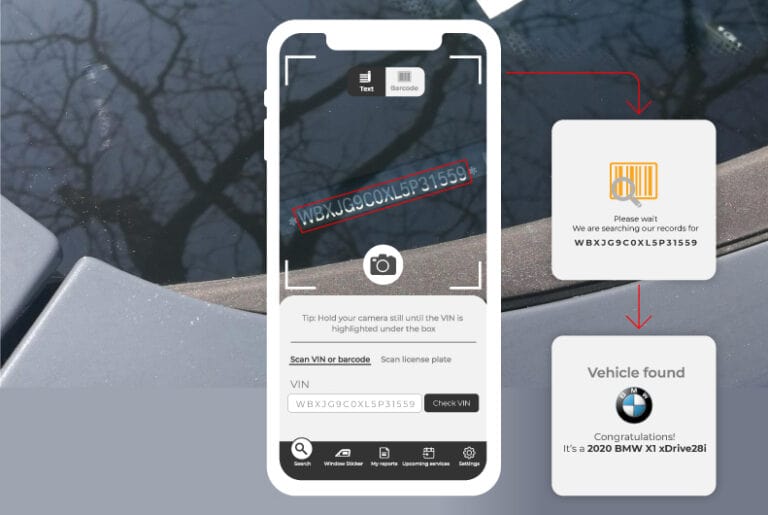
Typing 17 characters on a phone is slow and error-prone, so scanning is the feature that makes a lookup app feel fast. A VIN usually appears in two places a camera can read: a barcode on the driver’s door jamb label, and the stamped plate on the dashboard, visible through the windshield.
Registration documents carry it as printed text. Barcodes are the most reliable to read; text needs OCR.
| Platform | Native option | Notes |
|---|---|---|
| iOS | Vision framework (VNDetectBarcodesRequest, VNRecognizeTextRequest) |
Barcode and text recognition run on the device |
| Android | ML Kit Barcode Scanning and Text Recognition, with CameraX | Runs on the device, no network needed |
| Flutter | mobile_scanner for barcodes, google_mlkit_text_recognition for text |
One codebase for iOS and Android |
| Desktop | USB barcode scanners (they type the code like a keyboard), or a webcam with a library such as ZXing | A scanner needs no code beyond a focused text field |
| Any platform | A scanner API that takes a photo and returns the VIN | Useful on desktop and low-end devices, at the cost of an upload |
Key Considerations for Production VIN Decoding
A demo that decodes one VIN is easy. These are the details that decide whether the feature survives real users.
| Concern | What to do |
|---|---|
| Key security | Never put your API key in the app. An API key in a mobile or desktop binary can be extracted, then anyone can consume your quota. The app calls your server; your server calls the provider. |
| Caching | A VIN's spec doesn't change, so cache decode results by VIN (e.g. in Redis, your Database). The history, recall, and valuation data changes more frequently and should have shorter lifetimes. Cache for lower latency and cost. |
| Rate limits | Read your plan's limits. On a 429 response, retry with exponential backoff, and queue bulk jobs instead of firing them all at once. |
| Offline use | Mechanics, inspectors, and yard staff frequently experience weak signal. Save scans locally (SQLite, Room, or Core Data), show VIN immediately, then sync lookups when the connection returns. |
| Error handling | Differentiate between an invalid VIN, a VIN with no record, a timeout, and a provider error. Each takes different wording and a different retry rule. |
| Privacy | Vehicle history and ownership information can be personal data. Log access; limit the information you keep and ensure compliance with privacy law in each market you operate. |
| Monitoring | Track latency, error rate, and cache hit rate for every endpoint so you know about a provider issue before your end users do. |
Retry with backoff (JavaScript)
					async function fetchWithRetry(url, options, retries = 3) {
  for (let attempt = 0; attempt <= retries; attempt++) {
    const res = await fetch(url, options);
    if (res.status !== 429 && res.status < 500) return res;
    if (attempt === retries) return res;
    const waitMs = 2 ** attempt * 500 + Math.random() * 250;
    await new Promise((r) => setTimeout(r, waitMs));
  }
}
Build vs. Buy: Which Approach Makes Sense for Your Product?
Building your own vehicle database is a reasonable choice only when vehicle data is your product. When it is a feature inside your product, the comparison usually favours an API.
| Factor | Build and maintain your own database | Use a VIN database API |
|---|---|---|
| Time to first working feature | Months: sourcing, cleaning and modelling the data first | Days: key, endpoint, results screen |
| Data sourcing | Licences or scraping, with legal and quality risk | Handled by the provider |
| Keeping it current | Your team updates it for every new model year, recall and market | Provider updates; you read the result |
| Market coverage | Each new country is a new data project | Depends on provider coverage, so check it |
| Engineering effort | Ongoing data engineering headcount | Integration and monitoring |
| Cost shape | High fixed cost, low cost per lookup | Low fixed cost, cost grows with usage |
| Control | Full control of schema and data | Bound to the provider's schema and limits |
| Risk | Stale or wrong data is your problem | Provider outage or price change is your problem |
| Best when | Vehicle data is your core product and you have the team | Vehicle lookup supports a larger product |
A common middle path is to start on an API, cache results in your own database, and revisit the question when usage and margins make it worth it. That gives you speed now and keeps your options open.
How to Choose a Vehicle API
The decoder you pick becomes part of your product, so test it against your own data before you commit.
| Criterion | What to check |
|---|---|
| Coverage | Which markets and VIN types are supported. Many decoders are strongest on North American VINs, so test VINs from every market you serve. |
| Data depth | Whether you get basic fields only, or trims, options, dimensions, engine detail and images. |
| Latency and uptime | Median and 95th-percentile response times from your servers, and the uptime commitment in the agreement. |
| Accuracy and failure behaviour | How errors, unknown VINs and partial matches are returned. Run a batch of VINs you already know. |
| Pricing model | Per-call, tiered or subscription, the free tier, overage charges, and what a cache hit costs you. |
| Caching and storage terms | Whether the licence lets you cache and store results. This shapes your architecture, so read it first. |
| Rate limits | Requests per second and per month, and how bulk jobs are handled. |
| SDKs, docs and sandbox | Official libraries for your platforms, clear error documentation and a sandbox you can test without paying. |
| Support and roadmap | Response times, a status page and how the provider announces changes. |
A useful test: take 50 to 100 VINs from your real users or inventory, run them through each candidate, and compare coverage gaps, wrong fields and response times side by side.
Get a Free API Key and Start Building
The fastest way to judge a vehicle API is to put it in your own app. Create an account, take a free API key and run the quick-start calls above against the sandbox with VINs from your real data.
Get a free API key to use the sandbox, SDKs and documentation, or read the API docs first to check endpoints, fields and limits against your design.
FAQs on Build a Vehicle Lookup App
Can the app do an API call by itself without using a backend?
Use a backend. A key shipped inside an app can be extracted, and a backend also gives you one place for caching, rate limiting and logging. If you have no server, put a thin proxy in front of the API, such as a serverless function.
Can the app work offline?
Partly. Scanning, local validation and saving a scan queue all work offline. Decoding needs the API, so queue the lookup and run it when the connection returns. Cache recent results on the device for repeat lookups.
Does this work for VINs from outside North America?
Vehicle Databases has dedicated decoders for each market. The basic VIN decode API accepts 17-character VINs for US and Canadian vehicles (model years 1981+).
Advanced VIN Decode API has data available from 1980. Europe VIN Decode API is available for European VINs.
How do I control API costs?
You can manage API costs by validating VIN formats before sending requests, caching eligible results, preventing duplicate calls, and monitoring usage across your application.
For example, if a user opens the same vehicle record several times, your app may be able to reuse a cached response instead of making another API request, subject to your plan’s terms.
Can I store the results in my own database?
Check the provider’s license. Terms differ on caching and storage, and they affect your architecture, so read them before you design around a cache.