
Invoice OCR API: Accurately Capture Invoice Data
Stop retyping invoices line by line. Upload a photo, scan, or PDF, and the Invoice OCR API returns every vendor detail, line item, and payment field as clean, structured JSON - ready to drop into your accounting, ERP, or business system.
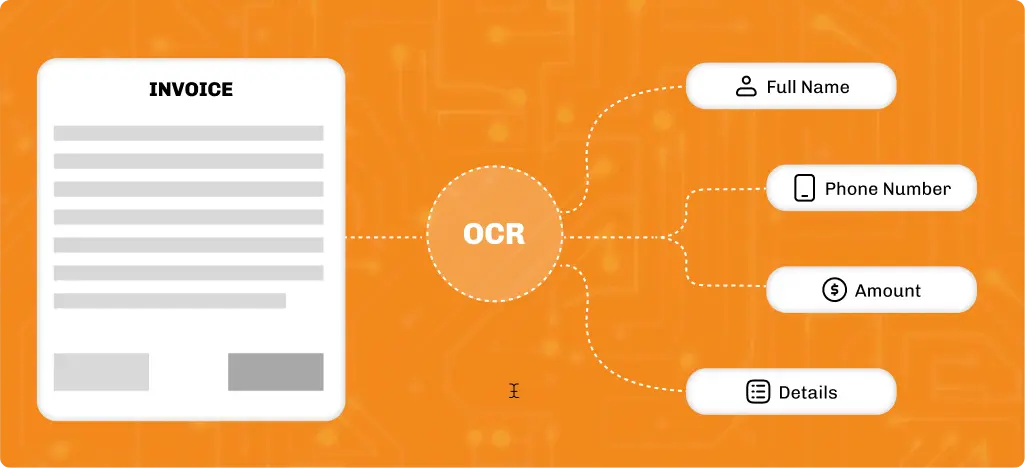
Getting From Invoice to JSON: How the API Works
Step 1: Send the File

Step 2: The API Reads It
Oil Filter - Standard 30 $6.75 $202.50
---------------------------------------------- Subtotal: $712.50 Tax: $58.78 Total: $771.28
Step 3: You Get JSON Back
					{
  "status": "success",
  "data": {
    "invoice_number": "INV-20481",
    "invoice_date": "2026-06-14",
    "due_date": "2026-07-14",
    "vendor_name": "Sunrise Auto Parts Supply",
    "vendor_address": "1420 Industrial Pkwy, Dallas, TX 75207",
    "line_items": [
      { "description": "Brake Pad Set - OEM", "qty": 12, "unit_price": 42.50, "total": 510.00 },
      { "description": "Oil Filter - Standard", "qty": 30, "unit_price": 6.75, "total": 202.50 }
    ],
    "subtotal": 712.50,
    "tax_amount": 58.78,
    "total": 771.28,
    "payment_terms": "Net 30"
  }
}
Try Out the Invoice OCR API For Free!
Extract Invoice Data Automatically!
High-Accuracy OCR Recognition
Multi-Page and Line-Item Aware
Lightning-Fast Response
One Request, Structured Output
99.99% Uptime
Simple REST API Integration
What Problem Is This API Actually Solving?
What Data Can the Invoice OCR API Extract?
Invoice Details
- Invoice Number
- Invoice Date
- Due Date
- Invoice Type (e.g., Purchase, Sales, Credit Note)
- PO Number (Purchase Order)
- Currency Type
- Invoice Status (Paid, Unpaid, Overdue)
Vendor & Buyer Info
- Vendor Name
- Vendor Address
- Vendor Phone / Email
- Vendor Website or Tax ID
- Buyer/Customer Name
- Customer Address
- Customer Contact Info
- VAT / GST Numbers
Payment Information
- Total Amount
- Subtotal
- Tax Rates and Tax Amounts (GST, VAT, Sales Tax)
- Discounts Applied
- Shipping & Handling Fees
- Grand Total
- Payment Terms (e.g., Net 30)
- Payment Method (Credit Card, Bank Transfer, etc.)
- Balance Due
Line Item-Level Extraction
- Product / Service Description
- Quantity
- Unit Price
- Line Item Total
- SKU or Product Code
- Tax Per Item
- Discounts Per Item
- Unit of Measure
Additional Fields
- Notes / Footer Text
- Signature Field (if scanned)
- Barcodes / QR Codes (if present)
- Terms & Conditions / Legal Text
Supported Image Formats and Input Types
Supported Invoice Types
- Supplier invoices
- Vendor invoices
- Purchase invoices
- Service invoices
- Repair shop invoices
- Parts invoices
- Fleet invoices
- Dealer invoices
- Utility invoices
- Digital invoices
- Scanned paper invoices
Supported File Formats
- PNG
- JPG
- JPEG
Supported Image Sources
- Mobile phone camera photos
- Scanned documents
- Uploaded files
- Multi-page PDF invoices
- Multi-page PDF invoices
No Code Required to Start Using the Invoice OCR API
How Businesses Use Our Invoice OCR API
The Invoice OCR API can automate invoice processing across a wide range of industries and workflows. Here are some of the most common ways businesses use it to reduce manual work and speed up operations.
Auto Repair Shops
Dealership Accounts Payable
Fleet and Logistics Operations
Insurance Claims Teams
Billing & Subscription Platforms
Auto Auction Platforms
Bookkeeping at Month-End
Startups & Developers
What Changes When You Stop Typing Invoices by Hand
Manual invoice entry slows your workflow and increases the risk of errors. Here’s how an Invoice OCR API compares to doing everything by hand.
| Manual Entry | Invoice OCR API | |
|---|---|---|
| Time per invoice | A few minutes | A few seconds |
| Line-item accuracy | Depends on who's typing | Consistent |
| Scales with volume | Requires more staff | No |
| Works from a phone photo | Not really | Yes |
| Output format | Whatever you type it as | Structured JSON |
| Feeds into your system | Manual export/import | Directly |
The API’s Got Everything Developers Need
From clean JSON responses to REST endpoints and scalable infrastructure, everything is designed to help developers build reliable invoice processing workflows faster. Top features are:
- REST API endpoints
- Structured JSON responses
- Fast response times
- Secure API authentication
- Comprehensive API documentation
- Sample requests and responses
- Easy integration with any programming language
- Sandbox testing environment
- Supports PDF, PNG, JPG, & JPEG files
- Batch invoice processing
- Consistent field extraction
- Production-ready infrastructure
- High API uptime
- Developer-friendly error responses
- Scalable for high-volume workloads
- Dedicated technical support
Build Smarter Workflows with Other Vehicle Databases APIs
The Invoice OCR API is even more powerful when combined with other Vehicle Databases APIs, including:
Need something more specific to your workflow? Our team builds custom automotive data integrations on request.
Join Thousands of Satisfied Vehicle Databases’ Customers
See what developers and businesses say about building with the Vehicle Databases Invoice OCR API.
Better experience... impossible


Easy to use, Excellent service

The support is top-notch

Ready to Automate Invoice Processing?
Integrate the Vehicle Databases Invoice OCR API to extract invoice information in seconds and receive clean, structured JSON that’s ready for your applications.
FAQs on Invoice OCR APIs
What is the best ocr software for invoice processing?
The Invoice OCR API provided by Vehicle Databases is a top-tier solution for invoice processing, offering fast, accurate, and scalable data extraction from PDFs or scanned images. Try our invoice OCR software today!
How can I use the invoice OCR API service?
You can choose to use it directly from our tool or easily integrate the Invoice OCR scan API into your application. Just upload an invoice (PDF or image), and receive structured JSON data ready for processing or storage.
Can I use OCR for invoice processing?
Yes, you can use invoice scanning OCR technology for invoice processing in several businesses. The OCR invoice API when integrated is widely used to automate data entry, reduce errors, and improve invoice workflow efficiency in various industries.
What invoice formats are supported?
The API supports PDF, JPG, PNG, and other standard image formats. The OCR invoice scanning software also works well with scanned or photographed invoices.
Is this accurate on real invoices, not just clean scans?
Yes. The Invoice OCR API is accurate on real invoices, not just clean scans. It is built around the reality that most invoices arrive as phone photos. Accuracy holds up on angled, slightly blurry, or unevenly lit images, not just ideal conditions.
Does it handle invoices with a lot of line items?
Yes, it handles invoices with a lot of invoice line items. The Invoice OCR API extracts every line item individually, including invoices that run several pages long.
What file types can I send it?
The Invoice OCR API supports PNG, JPG, JPEG, and PDF files, including multi-page PDFs.
Can I use this without building an integration first?
Yes, you can use the Invoice OCR API without building an integration first. Upload invoices directly from your dashboard after signing up and get structured results without writing any code.
How is this different from generic OCR tools?
Unlike generic OCR tools that return raw text, our invoice capture to JSON API returns invoice fields already separated and labeled, including totals, vendor details, and line items.
How fast does a single invoice come back?
Our invoice capture to JSON API typically processes a single invoice in a few seconds, depending on file size and network conditions. It’s fast enough for live upload workflows, not just background batch jobs.
Will it work on a phone photo of a paper invoice?
Yes, it works on a phone photo of a paper invoice. Phone photos are one of the most common ways invoices are submitted, and the Invoice OCR API is built to handle them.
How long does integration usually take?
Most teams have the Invoice OCR API integrated within a day. It’s a single POST endpoint with a structured JSON response.
Is there a free way to test it first?
Yes. New accounts get free credits, and you can also test the Invoice OCR API directly with a sample upload before signing up.