


From VIN to Vehicle Listing: A Dealer's Guide to Inventory Automation
A dealer's inventory record can be built from one input: the VIN. Instead of typing the year, make, model, trim, engine, options and colors for every vehicle, staff enter or scan the VIN and a vehicle data API fills in the rest, so the listing is complete, consistent, and ready to price.
This guide explains how to build that into a dealer CRM or dealer management system (DMS). It covers what manual entry costs, what dealers and software vendors each gain, how the automation works, which Vehicle Databases endpoints fill which fields, and how to price from market value.
In short
- VIN auto-fill replaces manual keying with one API call, so listings go live faster and with fewer errors.
- Dealers gain staff time, faster stock turn and more consistent records. Software vendors gain a feature they can ship without building or maintaining a vehicle database.
- Treat the API result as a draft that staff confirm. Decoded data is accurate for the factory build, but the car on the lot may have been modified, reconditioned or miskeyed.
Which Dealers and Software Companies Use Vehicle Data in Their Systems
VIN data helps wherever a vehicle record is created or compared. The benefit differs by who runs the system.
Who | What They Run | What Vehicle Data Does For Them |
|---|---|---|
| DMS and CRM vendors | Dealer platforms sold to many stores | Adds VIN auto-fill, specifications and pricing as built-in features, without owning a vehicle database |
| Dealer software companies | Websites, inventory feeds, appraisal and listing tools | Gives every feed the same complete, consistent attributes |
| Dealer groups | Several rooftops sharing stock | Keeps records identical across stores, so transfers, reporting and search work |
| Classifieds platforms and marketplaces | Listings from many sellers | Improves listing quality and the accuracy of search filters |
| Fleet managers and remarketing teams | Asset registers and disposal pricing | Fills asset records from a VIN and benchmarks resale value |
What Manual Vehicle Data Entry Costs
Every vehicle that enters stock is typed in by someone, usually from a window sticker, a trade-in form or an auction sheet. The cost shows up in five places.
- Slow time to list
A vehicle cannot be advertised until its fields are filled in. Each minute of keying is a minute the vehicle is on the lot without an online listing.
- Listing errors
A wrong trim, engine or option set puts the vehicle in the wrong search results and the wrong price band. Two trims of one model can carry different equipment and different prices.
- Inconsistent records
One person types "4dr Sedan", another "Sedan 4D". Filters, reports and duplicate checks stop working because the same value has many spellings.
- Duplicated work
The same specifications are retyped into the DMS, the website and each third-party portal.
- Rework and disputes
Errors are found by buyers, not staff, and lead to corrections, price disputes and lost trust.
None of these is a staffing problem. They come from asking people to copy facts that already exist in a database keyed by the VIN.
What Dealers and Software Vendors Gain
VIN autofill pays off for two different buyers, and they measure it differently.
For dealers and dealer groups
- Staff time saved. Staff enter a VIN and a mileage instead of keying a dozen fields per vehicle. The saving grows with every vehicle acquired.
- Faster stock turn. Vehicles reach the website and third-party portals sooner, because the listing no longer waits for data entry.
- Fewer errors and disputes. Specifications come from the VIN, so trims and equipment match the vehicle. Buyers find fewer surprises, and fewer corrections reach your desk.
- Consistent records across stores. Every rooftop uses the same values, so transfers, reports and duplicate checks work.
- Better leads. Complete, accurate listings appear in the right searches and answer buyers' questions before they call.
For DMS, CRM and dealer software vendors
- Ship the feature without the data operation. VIN auto-fill, specification lookup and pricing guidance become product features. You do not source, clean or update vehicle data for every model year and market.
- A competitive feature in a crowded category. Dealers compare platforms on how little typing they require.
- Less support load. Fewer wrong-trim and wrong-option tickets from customers.
- Predictable cost. A usage-based API replaces a data team, and the cost scales with the number of vehicles your customers add.
- Room to add more later. Once the VIN is decoded, window stickers, recalls and market values are further calls to the same provider.
How VIN Listing Automation Works
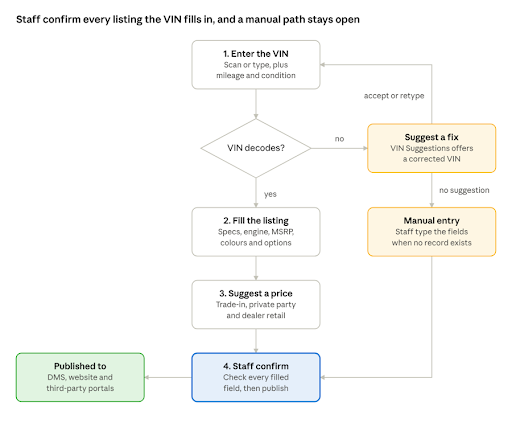
Staff enter a VIN, mileage and condition. A VIN that decodes fills the listing and suggests a price, and a person confirms it before it goes live. A VIN that does not decode gets a suggested correction, and when there is no record at all, staff type the fields as they do today.
From VIN to a Complete Inventory Record: What the API Fills In
Staff still supply what only they know. The API fills in what the VIN already determines.
What Staff Still Enter
Field | Why a Person Supplies It |
|---|---|
| VIN | The one identifier the whole record is built from. Scan it or type it |
| Odometer reading | The mileage record on the odometer |
| Condition | A judgement made on inspection |
| Actual exterior and interior colour | The API lists the colors the factory offered for the build. Staff pick the one on the vehicle. |
| Stock number, cost, location | Your own inventory data |
| Asking price | A business decision, informed by market value |
| Photos and description | Taken from the actual vehicle |
What the API Fills In
Inventory Field | API Field | Endpoint |
|---|---|---|
| Year, make, model, trim | basic.year, basic.make, basic.model, basic.trim | Basic VIN Decode |
| Body style, doors, seats | basic.body_type, basic.doors, basic.seating_capacity | Basic VIN Decode |
| Engine | engine.engine_description, engine.engine_size, engine.cylinders | Basic VIN Decode |
| Drivetrain, fuel type | drivetrain.drive_type, fuel.fuel_type | Basic VIN Decode |
| Country of manufacture | manufacturer.country | Basic VIN Decode |
| Transmission | transmission.type, transmission.description | Advanced VIN Decode |
| Original MSRP and invoice price | price.base_msrp, price.invoice_price, price.total_price | Advanced VIN Decode |
| Fuel economy | specifications (epa_city_economy, epa_hwy_economy, epa_combined_economy) | Advanced VIN Decode |
| Available colours, options and packages | exterior_colors, interior_colors, oem_options_and_packages | Advanced VIN Decode |
| Open recalls | recalls | Advanced VIN Decode |
| Suggested retail price | market_value by condition | Market Value |
Two cautions for the listing form. Every value comes back as text, and an unknown value is an empty string, so convert numbers and hide blank fields. And the color, option, and package lists describe what the factory offered for that build, not necessarily what is on the vehicle.
For the equipment installed at the factory, the Window Sticker API recreates the sticker for the VIN, and staff confirm the rest on the lot.
Which Vehicle Databases API Fills Which Part of the Inventory Record
Most dealer integrations use three or four of these endpoints. All are GET requests with your key in the x-authkey header.
API | Endpoint | Use in a dealer system | Coverage |
|---|---|---|---|
| Basic VIN Decode | /vin-decode/{vin} | Auto-fill year, make, model, trim, body, engine, drivetrain and fuel | US and Canada, 1981 onward |
| Advanced VIN Decode | /advanced-vin-decode/v2/{vin} | Add MSRP, transmission, fuel economy, colors, options, packages and recalls | US, Canada and Europe, 1980 onward |
| VIN Suggestions | /vin-suggestion/v2/{vin} | Catch a mistyped VIN and offer a corrected one with year, make and model | 1981 to 2026 |
| Market Value | /market-value/v2/{vin} with optional mileage and state | Appraise trade-ins and guide asking prices | US vehicles, 1981 onward |
| Vehicle Specifications | /ymm-specs/v3/{year}/{make}/{model}/{trim} | Fill specifications when you know the year, make, model and trim but have no VIN | 1981 to 2026 |
| Window Sticker | See the product page and documentation | Recreate the factory sticker for a VIN, with equipment, option codes and pricing | US and Canada, 1981 onward |
| Vehicle Recalls | /vehicle-recalls/{vin} | Check open recalls before a vehicle is sold | See the documentation |
These endpoints return data about the vehicle's specification and value. They do not return photos of the specific vehicle on your lot, so photography stays part of your intake process.
Pricing Each Vehicle with Market Value
The Market Value API gives you a price range for a vehicle in one call. Send the VIN, plus the mileage and the US state if you have them, and it returns three values for each of four conditions.
The example below is the sample response from the documentation, a 2011 BMW 328i in New York with 12,000 miles.
Condition | Trade-in | Private party | Dealer retail |
|---|---|---|---|
| Outstanding | $6,829 | $12,153 | $15,200 |
| Clean | $6,483 | $11,473 | $14,273 |
| Average | $5,906 | $10,341 | $12,727 |
| Rough | $5,157 | $8,869 | $10,719 |
Each column answers a different question for the dealer.
- Trade-in is what you can pay when you acquire the vehicle. Use it at appraisal.
- Private party is what the vehicle would fetch in a sale between individuals. Use it to see where you sit against private sellers.
- Dealer retail is the basis for your asking price on the lot.
A simple pricing rule. Start from the dealer-retail value for the vehicle's condition, adjust for your market and your days-in-stock target, and keep the price above your cost plus reconditioning. Staff set the final price. The API does not decide it.
Notes for the integration
- Values come back as formatted text such as "$12,727". Strip the symbol and commas before you do arithmetic.
- Condition matters more than any other input here. Capture it in your intake form, and send mileage and state with every request.
- Values are estimates built from market and transaction data. Re-run them on a schedule while a vehicle is in stock, and treat a large gap between your price and the market value as a prompt to review, not an instruction to reprice.
How to Roll Out VIN Auto-Fill in Your CRM or DMS
Start small, measure against a baseline, then widen the rollout.
- Record a baseline first. Time a sample of vehicles from intake to live listing, and count the fields typed and the corrections made after publishing. You cannot show an improvement you did not measure.
- Pick one workflow. Listing creation and trade-in appraisal are the usual starting points, because both begin with a VIN.
- Capture the VIN well. Offer a barcode scan or a typed entry, validate the format locally, and use VIN Suggestions when a decode fails.
- Pre-fill and mark. Fill the form from the API and visibly mark which fields came from the VIN, so staff know what to check and what is a fact.
- Add pricing guidance. Show trade-in, private-party, and dealer-retail values next to the asking-price field.
- Store results by VIN. Keep the decoded result with the stock record and reuse it for the website, portals, and reports. Check your provider's licence for the storage terms first.
- Pilot at one store, then roll out. Compare against the baseline and fix the form before the other stores see it.
What to Measure
Metric | How to Measure it | What it Tells You |
|---|---|---|
| Time from intake to live listing | Timestamp the stock record at intake and at publish | Whether stock reaches buyers faster |
| Fields typed per vehicle | Count manual field edits in the listing form | How much keying the automation removed |
| Corrections after publish | Count listing edits in the first week | Whether accuracy improved |
| VIN decode rate | Decoded VINs divided by VINs submitted | Whether your inventory is within the provider's coverage |
| Share of auto-filled fields staff change | Compare the draft with the saved listing, field by field | Which fields you cannot trust and need to review |
| Days in stock | Average days from intake to sale, by price band | Whether pricing guidance helps stock turn |
| Consistency of make, model and trim values | Count distinct spellings per model before and after | Whether reports and filters now work |
What to Ask a Vehicle Data Provider Before You Integrate
A dealer system makes many small calls from many users at once. Test these points with your own inventory before you commit.
Question | Why it Matters for a Dealer System |
|---|---|
| Which markets, model years and vehicle types are covered, for each endpoint? | Decode, valuation and window-sticker coverage differ. A gap means staff fall back to typing. |
| How accurate are trim and option matches? | A wrong trim is the most expensive error in a listing. Test with 50 to 100 of your own VINs. |
| How fast does a lookup return? | Staff wait on the form. Measure response time from your servers, not from a demo. |
| What are the rate limits, and do they differ by endpoint? | Many stores work at once. Some Vehicle Databases endpoints have a strict 1 request per second limit, and others depend on your package. |
| Can we cache and store the results with each stock record? | Storing decode results by VIN saves calls and cost, but the licence decides what is allowed. |
| Can we expose the data inside our own product to our customers? | Software vendors need the right to embed data in a feature they sell. Ask about reseller and white-label terms. |
| How are no-record and failed lookups returned and charged? | Your form needs a clear fallback, and your costs need to be predictable. |
| Are endpoints versioned, and how are changes announced? | A renamed field breaks every listing form. Look for versioned paths and a changelog. |
| What onboarding and support are available? | Integrations go faster with someone who knows the odd cases. |
Book a Demo With Vehicle Databases
The quickest test is your own stock. Take 50 to 100 VINs from your inventory, run them through the decode, VIN suggestions, and market value endpoints, and compare the drafts with your current listings. Count the fields that match, the fields staff would change and the VINs with no record.
Book a demo to walk through your DMS or CRM workflow with the team, or start the free trial. The API documentation covers every endpoint, field, and error code.
FAQs About Dealer Inventory Database
Does the API tell which options are installed on a specific vehicle?
Yes, the Advanced VIN Decode lists the colors, options, and packages the factory offered for that build. It does not prove which ones are fitted to the car on your lot. The Window Sticker API recreates the factory sticker for a VIN, with its equipment and option codes, and staff should confirm the rest on the vehicle.
Can I fill in a vehicle that has no VIN?
Yes, in part. The vehicle specifications endpoint returns specifications from the year, make, model and trim. Market Value and Window Sticker also accept year, make and model and a license plate API takes the vehicle’s plate number instead of the VIN. Note that a VIN is still the most precise starting point.
What if staff mistype the VIN?
The VIN Suggestions endpoint checks a 17-character VIN, reports whether it is valid, and returns a corrected VIN with its year, make, and model when it can. Show the suggestion and let the user accept it.
Does a decoded record describe modified or reconditioned vehicles?
No, a VIN decoded with the VIN decoder API describes the vehicle as built at the factory. Wheels, engine swaps, color changes, and added equipment will not appear, so keep a field for staff notes and let staff override any filled value.
Which markets does this cover?
Basic VIN Decode covers US and Canadian VINs. Advanced VIN Decode also covers Europe. Market Value is for US vehicles. If you sell outside those markets, test your VINs before you plan the rollout.
How do we handle rate limits across many stores?
Some tips to handle rate limits included routing every request through one backend, caching results by VIN, and queuing bursts such as a bulk inventory import. Limits depend on the endpoint and your package, so check them before you size the integration.

About Joses Peter
11 articles published
Joses Peter is a seasoned writer with a portfolio of 100+ blog posts and two published papers. Currently, she contributes as a professional writer in the automotive industry, with a great passion for technology and automobiles. This passion keeps her constantly learning and translating complex tech concepts into accessible content.